Debugging a Localization-Induced Status Misclassification Bug in a Web UI
1. Background
During routine troubleshooting of a web-based management portal, an unusual behavior was observed:
- When the browser language was set to English, a channel status appeared as
healthy - When the browser language was set to Japanese, the same channel appeared as
エラー(Error)

2. Initial Verification
To rule out backend issues, API responses were inspected using browser DevTools:
GET /.../channel/status?channelid=xxx
Response:
{
    "channel_id": "29f337e2-e6df-4cfd-b313-ed92e9d8a0c7",
    "push_status": "Success",
    "last_failure": 0,
    "last_push": 1772181312030,
    "activity": ""
}
Conclusion
- Backend status is normal
- No actual failure occurred
- Issue is likely in the frontend rendering logic
3. Investigation Process
Step 1: Identify frontend status transformation
The frontend converts API response into a display field:
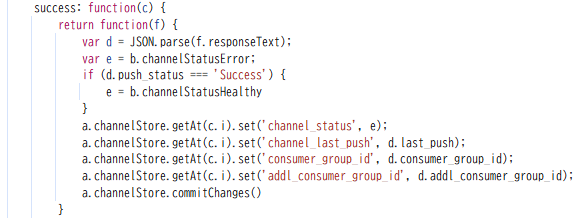
👉 Important detail:
channel_statusis not from backend- It is a derived, display-oriented field
Step 2: Inspect localization
Further inspection revealed:
channelStatusHealthy: "健全",
channelStatusError: "エラー"
Which means:
| Language | Value |
|---|---|
| English | Healthy |
| Japanese | 健全 |
Step 3: Locate rendering logic
The renderer responsible for status display:
if (e.get('channel_status').includes('Healthy')) {
  // healthy branch
} else {
  // error branch
}
4. Root Cause Analysis
The issue was caused by incorrect use of localized strings in logic, and importantly, this pattern appeared in multiple places in the frontend code.
❌ Issue 1: Channel Status Rendering
if (e.get('channel_status').includes('Healthy')) {
  // healthy branch
} else {
  // error branch
}
Problem
channel_statusis already localized- English:
"Healthy" - Japanese:
"健全"
- English:
- Logic still checks for English string
"Healthy"
Result
- English → works
- Japanese → fails → falls back to error
❌ Issue 2: Session Status Rendering
if (b.includes('healthy')) { ... }Problem
- Same pattern: hardcoded English string matching
session_statusmay also be localized depending on language
Risk
- Any non-English environment may:
- Misclassify status
- Display incorrect icons/colors
- Show wrong operational state
Behavior comparison
| Language | channel_status | includes(“Healthy”) | Result |
|---|---|---|---|
| English | Healthy | ✅ true | healthy |
| Japanese | 健全 | ❌ false | error |
5. Reproduction & Validation
Both code paths were patched using Chrome DevTools Local Overrides.
Channel status fix
if (
  e.get('channel_status').includes('Healthy') ||
  e.get('channel_status').includes('健全')
) {
Session status fix
if (b.includes('healthy') || b.includes('健全')) { ... }Result
- UI behavior became consistent across languages
- Japanese environment correctly reflected healthy state
- Issue fully validated as frontend logic flaw

6. Conclusion
This case was mainly about identifying and tracing the root cause of an unexpected UI behavior.
Starting from a simple inconsistency between UI and API response, the investigation focused on:
- Verifying backend data
- Tracing how data is transformed in the frontend
- Locating where the logic deviates from expected behavior
Eventually, the issue was narrowed down to frontend logic relying on localized strings for status checks.
While the problem itself was not complex, the process highlights an important point:
UI issues are not always caused by backend problems — they often come from how data is handled and interpreted in the frontend.
Hopefully, this debugging process can provide some reference when dealing with similar frontend issues, especially in multi-language environments.
Recent Comments